<?xml version="1.0" encoding="utf-8"?><feed xmlns="http://www.w3.org/2005/Atom" ><generator uri="https://jekyllrb.com/" version="3.10.0">Jekyll</generator><link href="https://andrewm4894.com/feed.xml" rel="self" type="application/atom+xml" /><link href="https://andrewm4894.com/" rel="alternate" type="text/html" /><updated>2026-04-18T22:26:20+00:00</updated><id>https://andrewm4894.com/feed.xml</id><title type="html">Andrew Maguire</title><subtitle>Personal notes on machine learning, anomaly detection, data engineering, and side projects.
</subtitle><author><name>Andrew Maguire</name></author><entry><title type="html">Bob Ross word cloud</title><link href="https://andrewm4894.com/2025/09/04/bob-ross-word-cloud/" rel="alternate" type="text/html" title="Bob Ross word cloud" /><published>2025-09-04T00:00:00+00:00</published><updated>2025-09-04T00:00:00+00:00</updated><id>https://andrewm4894.com/2025/09/04/bob-ross-word-cloud</id><content type="html" xml:base="https://andrewm4894.com/2025/09/04/bob-ross-word-cloud/"><![CDATA[<p>Here is a colab to generate a Bob Ross word cloud.</p>

<p><a href="https://colab.research.google.com/drive/1lLpUyA6LdKLLXiptEDFLoIWEpek8xu5J?usp=sharing">https://colab.research.google.com/drive/1lLpUyA6LdKLLXiptEDFLoIWEpek8xu5J?usp=sharing</a></p>

<p>(Because this is what we do now with AI).</p>

<p>(and i needed it for a deck).</p>]]></content><author><name>Andrew Maguire</name></author><category term="llm" /><category term="machine-learning" /><category term="llm" /><summary type="html"><![CDATA[Here is a colab to generate a Bob Ross word cloud.]]></summary></entry><entry><title type="html">bolt.new vs o1 - some thoughts</title><link href="https://andrewm4894.com/2024/12/19/bolt-new-vs-o1-some-thoughts/" rel="alternate" type="text/html" title="bolt.new vs o1 - some thoughts" /><published>2024-12-19T00:00:00+00:00</published><updated>2024-12-19T00:00:00+00:00</updated><id>https://andrewm4894.com/2024/12/19/bolt-new-vs-o1-some-thoughts</id><content type="html" xml:base="https://andrewm4894.com/2024/12/19/bolt-new-vs-o1-some-thoughts/"><![CDATA[<p>this is funny - i tried to make a little app to share daily factoids from chatgpt on a site - just as excuse to learn javascript really.</p>

<p>bolt.new is great and i felt like a wizard at first just freestyling away on the keys but man what a mess i ended up creating - ended up down various dead ends with firebase and deployment to netlify and lots of infra related mess that ended up waaay too complex for me at that stage down the rabbirt hole to know where to start to try untangle anything.</p>

<p>so i jumped over to chatgpt o1 and just have an actual conversation and some back and forth - chatgpt was much more nuanced and less eager to just start cranking out code for me.</p>

<p>we took it step by step and i was actually learning some stuff at each stage rather than blind and wild js flying all over the place.</p>

<p>so ended up with an actual repo in gh thats deployed and a fairly decent starting point for what i want: <a href="https://github.com/andrewm4894/andys-daily-factoids">https://github.com/andrewm4894/andys-daily-factoids</a></p>

<p><a href="https://andys-daily-factoids.com">https://andys-daily-factoids.com</a></p>

<p>Anyway funny part is that all my factoids are about how Octopuses have 3 hearts! It really really loves this fact.</p>

<p>Also honey does not spoil is a strong 2nd favorite.</p>

<p>Next step is to add last 100 or so factoids in the prompt and ask it not to repeat itself…</p>]]></content><author><name>Andrew Maguire</name></author><category term="llm" /><category term="machine-learning" /><category term="llm" /><summary type="html"><![CDATA[this is funny - i tried to make a little app to share daily factoids from chatgpt on a site - just as excuse to learn javascript really.]]></summary></entry><entry><title type="html">Anomstack - Data Engineering Podcast</title><link href="https://andrewm4894.com/2024/12/03/anomstack-data-engineering-podcast/" rel="alternate" type="text/html" title="Anomstack - Data Engineering Podcast" /><published>2024-12-03T00:00:00+00:00</published><updated>2024-12-03T00:00:00+00:00</updated><id>https://andrewm4894.com/2024/12/03/anomstack-data-engineering-podcast</id><content type="html" xml:base="https://andrewm4894.com/2024/12/03/anomstack-data-engineering-podcast/"><![CDATA[<p>I was recently on the <a href="https://www.dataengineeringpodcast.com/">Data Engineering Podcast</a> to chat about anomaly detection and a open source side project im working on - <a href="https://github.com/andrewm4894/anomstack">anomstack</a>.</p>

<p>You can listen to it <a href="https://www.dataengineeringpodcast.com/episodepage/anomstack-open-source-business-metric-anomaly-detection-episode-404">here</a> or just search “anomstack data eng” in wherever you listen to podcasts.</p>]]></content><author><name>Andrew Maguire</name></author><category term="anomaly-detection" /><category term="data-eng" /><category term="machine-learning" /><category term="anomaly-detection" /><category term="data" /><category term="machine-learning" /><summary type="html"><![CDATA[I was recently on the Data Engineering Podcast to chat about anomaly detection and a open source side project im working on - anomstack.]]></summary></entry><entry><title type="html">Weights &amp;amp; Biases - log Keras model summary &amp;amp; architecture</title><link href="https://andrewm4894.com/2024/03/04/weights-biases-log-keras-model-summary-architecture/" rel="alternate" type="text/html" title="Weights &amp;amp; Biases - log Keras model summary &amp;amp; architecture" /><published>2024-03-04T00:00:00+00:00</published><updated>2024-03-04T00:00:00+00:00</updated><id>https://andrewm4894.com/2024/03/04/weights-biases-log-keras-model-summary-architecture</id><content type="html" xml:base="https://andrewm4894.com/2024/03/04/weights-biases-log-keras-model-summary-architecture/"><![CDATA[<p>Maybe i missed something but i could not find any easy and simple out of the box ways to just save Keras <code class="language-plaintext highlighter-rouge">[model.summary()](https://github.com/keras-team/keras/blob/v3.0.5/keras/models/model.py#L217)</code> and <code class="language-plaintext highlighter-rouge">[plot_model()](https://keras.io/api/utils/model_plotting_utils/#plotmodel-function)</code> outputs to <a href="https://wandb.ai/site">wandb</a>.</p>

<p>So below is one little recipie to do this, feel free to use and adapt however suits your needs.</p>

<div class="gist-embed">
  <script src="https://gist.github.com/andrewm4894/7c22a7944b791959bbf662b87cb0139d.js"></script>

</div>]]></content><author><name>Andrew Maguire</name></author><category term="machine-learning" /><category term="observability" /><category term="machine-learning" /><category term="observability" /><category term="python" /><category term="wandb" /><summary type="html"><![CDATA[Maybe i missed something but i could not find any easy and simple out of the box ways to just save Keras [model.summary()](https://github.com/keras-team/keras/blob/v3.0.5/keras/models/model.py#L217) and [plot_model()](https://keras.io/api/utils/model_plotting_utils/#plotmodel-function) outputs to wandb.]]></summary></entry><entry><title type="html">MLOps Community Podcast!!!</title><link href="https://andrewm4894.com/2023/12/20/mlops-community-podcast/" rel="alternate" type="text/html" title="MLOps Community Podcast!!!" /><published>2023-12-20T00:00:00+00:00</published><updated>2023-12-20T00:00:00+00:00</updated><id>https://andrewm4894.com/2023/12/20/mlops-community-podcast</id><content type="html" xml:base="https://andrewm4894.com/2023/12/20/mlops-community-podcast/"><![CDATA[<p>What a time to be alive when nerds like us can geek out every week listening to leaders in the field chatting about what their favourite coffee is and all the cool stuff they are working on!</p>

<p>This is required listening for anyone working with data - really great sort of inside baseball stuff too that you get via tidbits here and there as you listen that really all compounds over time.</p>

<p>And also Demetrios the host is glorious!</p>

<p>I always have it at the top of podcasts and YouTube channels I recommend to anyone in data from students starting off to old timers like myself (I’m embracing it).</p>

<p>Also the site and platform is really cool too: <a href="https://mlops.community/">https://mlops.community/</a></p>

<p>p.s. i write this post after about an hour trying to find one single decent platform (except apple obviously) to leave a review to try show support for the show. In the end it was too painful so I wrote this ¯\_(ツ)_/¯</p>]]></content><author><name>Andrew Maguire</name></author><category term="machine-learning" /><category term="community" /><category term="mlops" /><category term="podcast" /><summary type="html"><![CDATA[What a time to be alive when nerds like us can geek out every week listening to leaders in the field chatting about what their favourite coffee is and all the cool stuff they are working on!]]></summary></entry><entry><title type="html">The Future of Machine Learning and AI Panel Discussion - Civo Navigate Europe 23</title><link href="https://andrewm4894.com/2023/11/06/the-future-of-machine-learning-and-ai-panel-discussion-civo-navigate-europe-23/" rel="alternate" type="text/html" title="The Future of Machine Learning and AI Panel Discussion - Civo Navigate Europe 23" /><published>2023-11-06T00:00:00+00:00</published><updated>2023-11-06T00:00:00+00:00</updated><id>https://andrewm4894.com/2023/11/06/the-future-of-machine-learning-and-ai-panel-discussion-civo-navigate-europe-23</id><content type="html" xml:base="https://andrewm4894.com/2023/11/06/the-future-of-machine-learning-and-ai-panel-discussion-civo-navigate-europe-23/"><![CDATA[<div class="youtube-embed">
  <iframe width="560" height="315" src="https://www.youtube.com/embed/nzrOzqz8B3U" title="YouTube video player" frameborder="0" allow="accelerometer; autoplay; clipboard-write; encrypted-media; gyroscope; picture-in-picture; web-share" allowfullscreen=""></iframe>
</div>]]></content><author><name>Andrew Maguire</name></author><category term="machine-learning" /><category term="machine-learning" /><summary type="html"><![CDATA[]]></summary></entry><entry><title type="html">10 Practical ML Use Cases in Observability</title><link href="https://andrewm4894.com/2023/10/25/10-practical-ml-use-cases-in-observability/" rel="alternate" type="text/html" title="10 Practical ML Use Cases in Observability" /><published>2023-10-25T00:00:00+00:00</published><updated>2023-10-25T00:00:00+00:00</updated><id>https://andrewm4894.com/2023/10/25/10-practical-ml-use-cases-in-observability</id><content type="html" xml:base="https://andrewm4894.com/2023/10/25/10-practical-ml-use-cases-in-observability/"><![CDATA[<div class="youtube-embed">
  <iframe width="560" height="315" src="https://www.youtube.com/embed/nX32fWot3XA" title="YouTube video player" frameborder="0" allow="accelerometer; autoplay; clipboard-write; encrypted-media; gyroscope; picture-in-picture; web-share" allowfullscreen=""></iframe>
</div>

<div class="slides-embed">
  <iframe src="https://docs.google.com/presentation/d/e/2PACX-1vSnhtU6BlLLdK9ha0LGo98F_mYeFCy3aL9kgKexJM6a98BCfO2jSXAECqTTn-4vnwDpTTYGMDz4aa5b/embed?start=false&amp;loop=false&amp;delayms=3000" title="10 Practical ML Use Cases in Observability - Google Slides" allowfullscreen="true" mozallowfullscreen="true" webkitallowfullscreen="true"></iframe>
</div>]]></content><author><name>Andrew Maguire</name></author><category term="anomaly-detection" /><category term="machine-learning" /><category term="observability" /><category term="time-series" /><category term="anomaly-detection" /><category term="machine-learning" /><category term="observability" /><category term="time-series" /><summary type="html"><![CDATA[]]></summary></entry><entry><title type="html">Malloy seems petty cool…</title><link href="https://andrewm4894.com/2023/07/01/malloy-seems-petty-cool/" rel="alternate" type="text/html" title="Malloy seems petty cool…" /><published>2023-07-01T00:00:00+00:00</published><updated>2023-07-01T00:00:00+00:00</updated><id>https://andrewm4894.com/2023/07/01/malloy-seems-petty-cool</id><content type="html" xml:base="https://andrewm4894.com/2023/07/01/malloy-seems-petty-cool/"><![CDATA[<p>I discovered <a href="https://github.com/malloydata/malloy">Malloy</a> recently in <a href="https://youtu.be/zmmJgwc3oPI">this great talk</a>, it seems like a really interesting idea (a higher level abstraction or DSL on top of sql) with some great people behind it (<a href="https://www.linkedin.com/in/lloydtabb/">looker founder</a> who seems to really know his stuff).</p>

<p>So I decided to try get going with it in as minimal a way as possible using everyone’s favourite dataset.</p>

<p><a href="https://github.com/andrewm4894/learn-malloy">https://github.com/andrewm4894/learn-malloy</a></p>

<p>To get going all you need to do is:</p>

<ul>
  <li>
    <p>install <a href="https://marketplace.visualstudio.com/items?itemName=malloydata.malloy-vscode">malloy vscode extension</a></p>
  </li>
  <li>
    <p>that’s pretty much it, each .malloy or .malloynb file will make it obvious how to run queries or run usual notebook style flow.</p>
  </li>
</ul>

<h2 id="id-moving-parts">Moving parts</h2>

<ul>
  <li>
    <p>a <a href="https://github.com/andrewm4894/learn-malloy/blob/main/titanic/titanic.source.malloy">source object</a> defining some sort of data connection (in this case just a local csv) and, optionally, some additional measures and dimensions.</p>
  </li>
  <li>
    <p>some <a href="https://github.com/andrewm4894/learn-malloy/blob/main/titanic/titanic.queries.malloy">queries</a> against a source. This is where i think it essentially becomes a sort of <a href="https://en.wikipedia.org/wiki/Domain-specific_language">DSL</a> (and more) on top of SQL.</p>
  </li>
  <li>
    <p>optionally some <a href="https://github.com/andrewm4894/learn-malloy/blob/main/titanic/titanic.styles.json">style objects</a> that can help map queries to output visualisations. This is what’s behind the magic of some of the default visualizations in the cool demos <a href="https://github.com/malloydata/try-malloy">here</a>.</p>
  </li>
  <li>
    <p>even the ability to bring it all together into a familiar <a href="https://github.com/andrewm4894/learn-malloy/blob/main/titanic/titanic.notebook.malloynb">notebook</a> experience.</p>
  </li>
</ul>

<h2 id="id-initial-thoughts">Initial thoughts</h2>

<ul>
  <li>
    <p>Seems like a really interesting project and idea (no doubt a lot has been learned from look.ml and those learnings will be baked into this project).</p>
  </li>
  <li>
    <p>Seems to have a lot of the abstractions right imo - feels natural in some sense while also still quite flexible.</p>
  </li>
  <li>
    <p>I was able to just guess about 70% of what I wanted or expected when writing some example queries.</p>
  </li>
  <li>
    <p>Can’t wait until I can use this natively in something like BigQuery UI and easily share results of analysis with co-workers.</p>
  </li>
  <li>
    <p>Seem to be a cool use case for duckdb in my csv example - need to learn more how that’s all working.</p>
  </li>
  <li>
    <p>I could see this becoming a nice standard way to package up and share analysis type projects with bosses and colleagues in a way that they can easily then play with, customize and build on if they have follow on questions - so i no longer become the bottleneck - great!</p>
  </li>
  <li>
    <p>Could also see this be quite a useful tool to translate and define business questions with stakeholders without having to show them any sql!</p>
  </li>
  <li>
    <p>One of my hot takes over last few years was that SQL is the new excel, but maybe Malloy could also be the new excel.</p>
  </li>
</ul>]]></content><author><name>Andrew Maguire</name></author><category term="data-eng" /><category term="data" /><category term="data-eng" /><category term="etl" /><category term="malloy" /><category term="sql" /><summary type="html"><![CDATA[I discovered Malloy recently in this great talk, it seems like a really interesting idea (a higher level abstraction or DSL on top of sql) with some great people behind it (looker founder who seems to really know his stuff).]]></summary></entry><entry><title type="html">Painless Anomaly Detection with Apache Airflow</title><link href="https://andrewm4894.com/2023/05/18/painless-anomaly-detection-with-apache-airflow/" rel="alternate" type="text/html" title="Painless Anomaly Detection with Apache Airflow" /><published>2023-05-18T00:00:00+00:00</published><updated>2023-05-18T00:00:00+00:00</updated><id>https://andrewm4894.com/2023/05/18/painless-anomaly-detection-with-apache-airflow</id><content type="html" xml:base="https://andrewm4894.com/2023/05/18/painless-anomaly-detection-with-apache-airflow/"><![CDATA[<p>Data observability <em>is</em> so hot right now…but do you know what’s also hot? Using some tried and tested ingredients like <a href="https://airflow.apache.org/">Apache Airflow</a> and <a href="https://pyod.readthedocs.io/en/latest/">PyOD</a> to perform painless anomaly detection on your key business metrics.</p>

<p>You don’t need to run off and buy an (expensive!) subscription for the latest hot data observability Sass offering (there is lots and some of them are great in my experience, <a href="https://www.metaplane.dev/">Metaplane</a> does a lot really well here in my opinion but i am of course not familiar with all of tools - <a href="https://mattturck.com/mad2023/">obligatory crazy landscape picture</a>).</p>

<p>If instead, you want to keep things simple to begin with, you probably already have most of the main ingredients you need for a pretty decent anomaly detection stack on whatever metrics you want - using our old friend Airflow and <a href="https://pypi.org/project/airflow-provider-anomaly-detection/">this</a> new anomaly detection provider package I built because I just love anomaly detection that much.</p>

<p>(I really do - metrics are everywhere so we need decent anomaly detection to avoid overload, anomaly detection is a great mix of art and science as can be quite subjective, and decent anomaly detection should some-day kill all dashboards!!!)</p>

<h2 id="id-anomaly-detection-airflow-provider">Anomaly detection Airflow provider</h2>

<p>So here is the <strong>TL;DR;</strong> (if curious for more detail check out the project <a href="https://github.com/andrewm4894/airflow-provider-anomaly-detection">README</a> on GitHub).</p>

<p>An Airflow Provider for Anomaly Detection:</p>

<ol>
  <li>
    <p>You define “metrics batches” in some sql (for example, <a href="https://github.com/andrewm4894/airflow-provider-anomaly-detection/blob/main/airflow_anomaly_detection/example_dags/anomaly-detection-dag/sql/metrics/metrics_hourly.sql">here</a> is the “metrics_hourly” batch in the example dag).</p>
  </li>
  <li>
    <p>Some yaml configuration fun (you can just use the defaults) for params of config you might want to change (for example, <a href="https://github.com/andrewm4894/airflow-provider-anomaly-detection/blob/main/airflow_anomaly_detection/example_dags/anomaly-detection-dag/config/metrics_hourly.yaml">here</a> is the config for the “metrics_hourly” batch).</p>
  </li>
  <li>
    <p>You get some alerts via email (which you can just use for Slack etc too) when metrics look anomalous.</p>
  </li>
</ol>

<h2 id="id-how-it-works">How it works</h2>

<p>Really all this provider and example dag are doing is creating a set of 4 dags within airflow, one set for each “metric batch” you define (different “metric batches” can be for different frequency or subject areas - you can use them however you want as each metric batch is basically just templated jinja sql files and a corresponding yaml config file):</p>

<ol>
  <li>
    <p><strong>Ingestion</strong>: Ingest each metric batch by running the sql and just appending the results (the metrics) to some table you can pointed it at.</p>
  </li>
  <li>
    <p><strong>Training</strong>: Train an anomaly detection model, one per metric within each metric batch, and save the trained model to a Google Cloud Storage (GCS) bucket.</p>
  </li>
  <li>
    <p><strong>Scoring</strong>: Use the model trained in step 2 to score recent data and save scored metrics to another table you have pointed it at.</p>
  </li>
  <li>
    <p><strong>Alerting</strong>: A dag that looks over recent scored metrics and just alerts based on traditional enough rolling thresholds on those scored metrics.</p>
  </li>
</ol>

<h2 id="id-pros-vs-cons">Pros vs. Cons</h2>

<p>Here are some pro’s and con’s to help you decide if using and getting involved in this project makes sense to you.</p>

<p><strong>Pros</strong>:</p>

<ul>
  <li>
    <p>You bring your SQL to define your metrics and let this provider do the rest.</p>
  </li>
  <li>
    <p>Nice and simple alerts.</p>
  </li>
  <li>
    <p>A lot of us are already using Airflow for ETL type stuff so we are quite comfortable with it.</p>
  </li>
  <li>
    <p>This just packages up the problem into a few Airflow dags and so makes it all a bit easier to reason about and understand (as well as customize if you like).</p>
  </li>
  <li>
    <p>A lot of us also have business metrics in cloud data stores like Google BigQuery, AWS Redshift, and Snowflake etc so we don’t actually need to involve a new database layer in any of this - just let Airflow do the orchestration and work for ingestion, training and scoring.</p>
  </li>
</ul>

<p><strong>Cons</strong>:</p>

<ul>
  <li>
    <p>Better suited for metric batches of stuff that does not need to be near real time - eg. hourly or daily business metrics are very well suited (it’s what I built this for).</p>
  </li>
  <li>
    <p>Still a fairly immature project so more a case of try it yourself and see how it goes (I’d love some help :) ).</p>
  </li>
  <li>
    <p>Some limits to the size and complexity of models that make sense - from my experience decent enough anomaly detection is totally possible with reasonable traditional ML models and sensible feature engineering.</p>
  </li>
  <li>
    <p>Don’t really have the ability to build a workflow into the anomaly alerts just yet - you get an email when something looks strange and that’s that - we don’t have any incident management type workflows as part of this since that would be another fairly complex moving part we are avoiding for now.</p>
  </li>
</ul>

<h2 id="id-get-involved">Get involved!</h2>

<p>This project is very very easy to get involved in and I hope could end up being quite useful for the wider Airflow community - it’s crazy that we don’t really have easy ways to just get some decent anomaly detection on all our business metrics within the same context of the ETL’s and dags we create all the time in Airflow.</p>

<p>The basic core idea is, le’ts just use Airflow for a bit more than ETL’s - one way to frame the anomaly detection use case is just some ETL’s and a few small python tasks so Airflow is a perfect tool for this.</p>

<p>Feel free to make issues and PR’s in the Github repo: <a href="https://github.com/andrewm4894/airflow-provider-anomaly-detection">https://github.com/andrewm4894/airflow-provider-anomaly-detection</a></p>

<h2 id="id-useful-links">Useful links</h2>

<ul>
  <li>
    <p>Project <a href="https://github.com/andrewm4894/airflow-provider-anomaly-detection/tree/main#readme">README</a></p>
  </li>
  <li>
    <p><a href="https://github.com/andrewm4894/airflow-provider-anomaly-detection#example-alert">Example alert</a> - An example of what an alert looks like.</p>
  </li>
  <li>
    <p><a href="https://github.com/andrewm4894/airflow-provider-anomaly-detection/tree/main/anomaly-gallery">Anomaly gallery</a> - Some real world example i have been adding while dogfooding.</p>
  </li>
  <li>
    <p><a href="https://github.com/andrewm4894/airflow-provider-anomaly-detection/tree/main/airflow_anomaly_detection/example_dags/anomaly-detection-dag">Example dag</a> - The example dag that ships with the provider. Best place to start and look around if just want to see what’s going on and already familiar with Airflow etc.</p>
  </li>
  <li>
    <p><a href="https://github.com/andrewm4894/airflow-provider-anomaly-detection#getting-started">Getting started</a> - How to play around and try it out yourself.</p>
  </li>
</ul>]]></content><author><name>Andrew Maguire</name></author><category term="airflow" /><category term="anomaly-detection" /><category term="machine-learning" /><category term="airflow" /><category term="anomaly-detection" /><category term="machine-learning" /><category term="python" /><summary type="html"><![CDATA[Data observability is so hot right now…but do you know what’s also hot? Using some tried and tested ingredients like Apache Airflow and PyOD to perform painless anomaly detection on your key business metrics.]]></summary></entry><entry><title type="html">Stripe Webhook + GCP Functions Framework (Python)</title><link href="https://andrewm4894.com/2022/12/22/stripe-webhook-gcp-functions-framework-python/" rel="alternate" type="text/html" title="Stripe Webhook + GCP Functions Framework (Python)" /><published>2022-12-22T00:00:00+00:00</published><updated>2022-12-22T00:00:00+00:00</updated><id>https://andrewm4894.com/2022/12/22/stripe-webhook-gcp-functions-framework-python</id><content type="html" xml:base="https://andrewm4894.com/2022/12/22/stripe-webhook-gcp-functions-framework-python/"><![CDATA[<p>This took a couple of days of messing around so decided to make a post out of it.</p>

<p><a href="https://github.com/andrewm4894/stripe-webhook-gcp-function">Here</a> is a minimal enough example repo using <a href="https://www.terraform.io/">Terraform</a> and <a href="https://cloud.google.com/functions/docs/functions-framework">GCP Functions Framework</a> to build a GCP Python function that will receive a <a href="https://stripe.com/docs/webhooks">Stripe webhook</a> event, perform <a href="https://stripe.com/docs/webhooks/signatures">signature verification</a>, and then just <a href="https://github.com/andrewm4894/stripe-webhook-gcp-function/blob/main/python-functions/stripe_webhook/main.py#L34">print the event</a>. You can adapt and build whatever logic you want then on top of this.</p>

<p><strong>TL DR;</strong> if you are looking at the stripe docs and cant figure out why you can run your python function locally but the signature verification fails once deployed to GCP functions (with this generic error message <code class="language-plaintext highlighter-rouge">error.SignatureVerificationError( stripe.error.SignatureVerificationError: No signatures found matching the expected signature for payload</code>) it could be that you need to replace <code class="language-plaintext highlighter-rouge">payload = request.data</code> with <code class="language-plaintext highlighter-rouge">payload = request.data.decode('utf-8')</code>. This i found out after a day or two thanks to <a href="https://stackoverflow.com/a/71756270/1919374">this SO comment</a>.</p>

<p>Most of what might be useful is in the <a href="https://github.com/andrewm4894/stripe-webhook-gcp-function#readme">repo readme</a>, but below i’ll quickly walk through the structure and moving parts.</p>

<h2 id="id-repo-structure">Repo structure</h2>

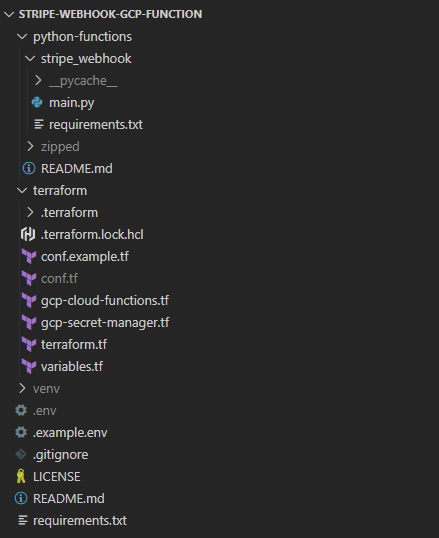
<p>Here are the main folders and files involved. Greyed out files are those that might have sensitive info and so are part of the <a href="https://github.com/andrewm4894/stripe-webhook-gcp-function/blob/main/.gitignore">`.gitignore`</a> and so not to be committed to source control. I’ll quickly walkthrough each folder and important files below.</p>

<p><img src="/assets/images/2022-12-22-stripe-webhook-gcp-functions-framework-python/dir-1.png" alt="" /></p>

<ul>
  <li><code class="language-plaintext highlighter-rouge">/python-functions</code> - The python code for the function lives in here.
    <ul>
      <li><code class="language-plaintext highlighter-rouge">/stripe_webhook</code> - A folder just for the “stripe_webhook” function.
        <ul>
          <li>
            <p><code class="language-plaintext highlighter-rouge">main.py</code> - Python source code for the function.</p>
          </li>
          <li>
            <p><code class="language-plaintext highlighter-rouge">requirements.txt</code> - Python libraries the function needs to run.</p>
          </li>
        </ul>
      </li>
      <li><code class="language-plaintext highlighter-rouge">/zipped</code> - A local folder of zipped up versions of the python function folders - this zip is what will be loaded to a GCS bucket as the source for the cloud function. This is ignored from source control and not needed.</li>
    </ul>
  </li>
  <li><code class="language-plaintext highlighter-rouge">/terraform</code> - All terraform related code and configuration files live in here to provision the cloud function and related cloud resources.
    <ul>
      <li>
        <p><code class="language-plaintext highlighter-rouge">conf.tf</code> - A file defining some confidential vars you want available to terraform but not in source control. See conf.example.tf for dummy example and instructions.</p>
      </li>
      <li>
        <p><code class="language-plaintext highlighter-rouge">gcp-cloud-functions.tf</code> - Terraform code to provision, configure and deploy all related cloud resources used by the function.</p>
      </li>
      <li>
        <p><code class="language-plaintext highlighter-rouge">gcp-secret-manager.tf</code> - Terraform code to define a GCP secret used by the cloud function. The Stripe secret will live in GCP secret manager.</p>
      </li>
      <li>
        <p><code class="language-plaintext highlighter-rouge">terraform.tf</code> - Some standard boilerplate used as part of Terraform set up and when initializing with `terraform init`</p>
      </li>
      <li>
        <p><code class="language-plaintext highlighter-rouge">variables.tf</code> - Some non-sensitive variables we want to use in defining our terraform resources.</p>
      </li>
    </ul>
  </li>
  <li>
    <p><code class="language-plaintext highlighter-rouge">/venv</code> - Our local python development virtual environment used for testing and debugging the function locally using the functions framework cli.</p>
  </li>
  <li>
    <p><code class="language-plaintext highlighter-rouge">.env</code> - A env file that will be picked up when running the function locally so that the <code class="language-plaintext highlighter-rouge">stripe_endpoint_secret</code> environment variable will be available locally (coming from <code class="language-plaintext highlighter-rouge">.env</code> file) and when running in GCP cloud (from GCP secrets manager). Also make sure if not under source control, see <code class="language-plaintext highlighter-rouge">.example.env</code> for a dummy example.</p>
  </li>
  <li>
    <p><code class="language-plaintext highlighter-rouge">.gitignore</code> - Things we want to make sure we don’t add to source control.</p>
  </li>
  <li><code class="language-plaintext highlighter-rouge">requirements.txt</code> - Python libraries we want to install into our `venv` for local execution and debugging of the function.</li>
</ul>

<h2 id="id-run-function-locally">Run function locally</h2>

<p>To run the function locally we can use the <a href="https://github.com/GoogleCloudPlatform/functions-framework-python#quickstart-http-function-hello-world">functions framework cli</a> like below:</p>

<div class="language-bash highlighter-rouge"><div class="highlight"><pre class="highlight"><code><span class="c"># run function locally in debug mode on port 8081</span>
functions-framework <span class="nt">--source</span><span class="o">=</span>./python-functions/stripe_webhook/main.py <span class="se">\</span>
  <span class="nt">--target</span><span class="o">=</span>stripe_webhook <span class="se">\</span>
  <span class="nt">--debug</span> <span class="se">\</span>
  <span class="nt">--port</span><span class="o">=</span>8081
</code></pre></div></div>

<p>This should return something like below to show the function running locally on port 8081 (you can use whatever port you want).</p>

<div class="language-powershell highlighter-rouge"><div class="highlight"><pre class="highlight"><code><span class="p">(</span><span class="n">venv</span><span class="p">)</span><span class="w"> </span><span class="n">PS</span><span class="w"> </span><span class="err">&gt;</span><span class="w"> </span><span class="nx">functions-framework</span><span class="w"> </span><span class="nt">--source</span><span class="o">=.</span><span class="n">/python-functions/stripe_webhook/main.py</span><span class="w"> </span><span class="nx">\</span><span class="w">
  </span><span class="nt">--target</span><span class="o">=</span><span class="n">stripe_webhook</span><span class="w"> </span><span class="nx">\</span><span class="w">
  </span><span class="nt">--debug</span><span class="w"> </span><span class="n">\</span><span class="w">
  </span><span class="nt">--port</span><span class="o">=</span><span class="mi">8081</span><span class="w">
 </span><span class="o">*</span><span class="w"> </span><span class="n">Serving</span><span class="w"> </span><span class="nx">Flask</span><span class="w"> </span><span class="nx">app</span><span class="w"> </span><span class="s1">'stripe_webhook'</span><span class="w">
 </span><span class="o">*</span><span class="w"> </span><span class="n">Debug</span><span class="w"> </span><span class="nx">mode:</span><span class="w"> </span><span class="nx">on</span><span class="w">
</span><span class="n">WARNING:</span><span class="w"> </span><span class="nx">This</span><span class="w"> </span><span class="nx">is</span><span class="w"> </span><span class="nx">a</span><span class="w"> </span><span class="nx">development</span><span class="w"> </span><span class="nx">server.</span><span class="w"> </span><span class="nx">Do</span><span class="w"> </span><span class="nx">not</span><span class="w"> </span><span class="nx">use</span><span class="w"> </span><span class="nx">it</span><span class="w"> </span><span class="nx">in</span><span class="w"> </span><span class="nx">a</span><span class="w"> </span><span class="nx">production</span><span class="w"> </span><span class="nx">deployment.</span><span class="w"> </span><span class="nx">Use</span><span class="w"> </span><span class="nx">a</span><span class="w"> </span><span class="nx">production</span><span class="w"> </span><span class="nx">WSGI</span><span class="w"> </span><span class="nx">server</span><span class="w"> </span><span class="nx">instead.</span><span class="w">
 </span><span class="o">*</span><span class="w"> </span><span class="n">Running</span><span class="w"> </span><span class="nx">on</span><span class="w"> </span><span class="nx">all</span><span class="w"> </span><span class="nx">addresses</span><span class="w"> </span><span class="p">(</span><span class="mf">0.0</span><span class="o">.</span><span class="nf">0</span><span class="o">.</span><span class="nf">0</span><span class="p">)</span><span class="w">
 </span><span class="o">*</span><span class="w"> </span><span class="n">Running</span><span class="w"> </span><span class="nx">on</span><span class="w"> </span><span class="nx">http://127.0.0.1:8081</span><span class="w">
</span><span class="n">Press</span><span class="w"> </span><span class="nx">CTRL</span><span class="o">+</span><span class="nx">C</span><span class="w"> </span><span class="nx">to</span><span class="w"> </span><span class="nx">quit</span><span class="w">
 </span><span class="o">*</span><span class="w"> </span><span class="n">Restarting</span><span class="w"> </span><span class="nx">with</span><span class="w"> </span><span class="nx">watchdog</span><span class="w"> </span><span class="p">(</span><span class="n">windowsapi</span><span class="p">)</span><span class="w">
 </span><span class="o">*</span><span class="w"> </span><span class="n">Debugger</span><span class="w"> </span><span class="nx">is</span><span class="w"> </span><span class="nx">active</span><span class="o">!</span><span class="w">
 </span><span class="o">*</span><span class="w"> </span><span class="n">Debugger</span><span class="w"> </span><span class="nx">PIN:</span><span class="w"> </span><span class="nx">XXX-XXX</span><span class="w">
</span></code></pre></div></div>

<h2 id="id-stripe-cli">Stripe CLI</h2>

<h3 id="id-set-up-local-forwarding">Set up local forwarding</h3>

<p>Once the function is running locally you can use the <a href="https://stripe.com/docs/stripe-cli">stripe cli</a> to (1) forward events to a local endpoint and then (2) trigger some test events to see the response.</p>

<div class="language-powershell highlighter-rouge"><div class="highlight"><pre class="highlight"><code><span class="c"># once function is running locally you can forward events to local endpoint</span><span class="w">
</span><span class="n">stripe</span><span class="w"> </span><span class="nx">listen</span><span class="w"> </span><span class="nt">--forward-to</span><span class="w"> </span><span class="nx">localhost:8081</span><span class="w">
</span></code></pre></div></div>

<p>You should see something like this when local forwarding is set up:</p>

<div class="language-powershell highlighter-rouge"><div class="highlight"><pre class="highlight"><code><span class="n">PS</span><span class="w"> </span><span class="nx">C:\Users\andre</span><span class="err">&gt;</span><span class="w"> </span><span class="nx">stripe</span><span class="w"> </span><span class="nx">listen</span><span class="w"> </span><span class="nt">--forward-to</span><span class="w"> </span><span class="nx">localhost:8081</span><span class="w">
</span><span class="err">&gt;</span><span class="w"> </span><span class="n">Ready</span><span class="o">!</span><span class="w"> </span><span class="nx">You</span><span class="w"> </span><span class="nx">are</span><span class="w"> </span><span class="nx">using</span><span class="w"> </span><span class="nx">Stripe</span><span class="w"> </span><span class="nx">API</span><span class="w"> </span><span class="nx">Version</span><span class="w"> </span><span class="p">[</span><span class="mi">2022</span><span class="nt">-11-15</span><span class="p">]</span><span class="o">.</span><span class="w"> </span><span class="nx">Your</span><span class="w"> </span><span class="nx">webhook</span><span class="w"> </span><span class="nx">signing</span><span class="w"> </span><span class="nx">secret</span><span class="w"> </span><span class="nx">is</span><span class="w"> </span><span class="nx">xxx_xxxxxx</span><span class="w"> </span><span class="p">(</span><span class="err">^</span><span class="n">C</span><span class="w"> </span><span class="nx">to</span><span class="w"> </span><span class="nx">quit</span><span class="p">)</span><span class="w">
</span></code></pre></div></div>

<h3 id="id-create-some-test-events">Create some test events</h3>

<div class="language-bash highlighter-rouge"><div class="highlight"><pre class="highlight"><code><span class="c"># create a test event</span>
stripe trigger payment_intent.succeeded
</code></pre></div></div>

<p>You should see something like this for a successful test event creation:</p>

<div class="language-powershell highlighter-rouge"><div class="highlight"><pre class="highlight"><code><span class="n">PS</span><span class="w"> </span><span class="nx">C:\Users\andre</span><span class="err">&gt;</span><span class="w"> </span><span class="nx">stripe</span><span class="w"> </span><span class="nx">trigger</span><span class="w"> </span><span class="nx">payment_intent.succeeded</span><span class="w">
</span><span class="n">Setting</span><span class="w"> </span><span class="nx">up</span><span class="w"> </span><span class="nx">fixture</span><span class="w"> </span><span class="nx">for:</span><span class="w"> </span><span class="nx">payment_intent</span><span class="w">
</span><span class="n">Running</span><span class="w"> </span><span class="nx">fixture</span><span class="w"> </span><span class="nx">for:</span><span class="w"> </span><span class="nx">payment_intent</span><span class="w">
</span><span class="n">Trigger</span><span class="w"> </span><span class="nx">succeeded</span><span class="o">!</span><span class="w"> </span><span class="nx">Check</span><span class="w"> </span><span class="nx">dashboard</span><span class="w"> </span><span class="nx">for</span><span class="w"> </span><span class="nx">event</span><span class="w"> </span><span class="nx">details.</span><span class="w">
</span></code></pre></div></div>

<p>If the function as been invoked successfully then in the window from step 1 above you should see something like this:</p>

<div class="language-powershell highlighter-rouge"><div class="highlight"><pre class="highlight"><code><span class="n">PS</span><span class="w"> </span><span class="nx">C:\Users\andre</span><span class="err">&gt;</span><span class="w"> </span><span class="nx">stripe</span><span class="w"> </span><span class="nx">listen</span><span class="w"> </span><span class="nt">--forward-to</span><span class="w"> </span><span class="nx">localhost:8081</span><span class="w">
</span><span class="err">&gt;</span><span class="w"> </span><span class="n">Ready</span><span class="o">!</span><span class="w"> </span><span class="nx">You</span><span class="w"> </span><span class="nx">are</span><span class="w"> </span><span class="nx">using</span><span class="w"> </span><span class="nx">Stripe</span><span class="w"> </span><span class="nx">API</span><span class="w"> </span><span class="nx">Version</span><span class="w"> </span><span class="p">[</span><span class="mi">2022</span><span class="nt">-11-15</span><span class="p">]</span><span class="o">.</span><span class="w"> </span><span class="nx">Your</span><span class="w"> </span><span class="nx">webhook</span><span class="w"> </span><span class="nx">signing</span><span class="w"> </span><span class="nx">secret</span><span class="w"> </span><span class="nx">is</span><span class="w"> </span><span class="nx">xxx_xxxxxx</span><span class="w"> </span><span class="p">(</span><span class="err">^</span><span class="n">C</span><span class="w"> </span><span class="nx">to</span><span class="w"> </span><span class="nx">quit</span><span class="p">)</span><span class="w">
</span><span class="mi">2022</span><span class="nt">-12-22</span><span class="w"> </span><span class="mi">12</span><span class="p">:</span><span class="mi">31</span><span class="p">:</span><span class="mi">10</span><span class="w">   </span><span class="o">--</span><span class="err">&gt;</span><span class="w"> </span><span class="n">charge.succeeded</span><span class="w"> </span><span class="p">[</span><span class="n">evt_3MHnvQFE3Qfj39xW1UE7UhT6</span><span class="p">]</span><span class="w">
</span><span class="mi">2022</span><span class="nt">-12-22</span><span class="w"> </span><span class="mi">12</span><span class="p">:</span><span class="mi">31</span><span class="p">:</span><span class="mi">10</span><span class="w">   </span><span class="o">--</span><span class="err">&gt;</span><span class="w"> </span><span class="n">payment_intent.succeeded</span><span class="w"> </span><span class="p">[</span><span class="n">evt_3MHnvQFE3Qfj39xW1vzt9gAn</span><span class="p">]</span><span class="w">
</span><span class="mi">2022</span><span class="nt">-12-22</span><span class="w"> </span><span class="mi">12</span><span class="p">:</span><span class="mi">31</span><span class="p">:</span><span class="mi">10</span><span class="w">   </span><span class="o">--</span><span class="err">&gt;</span><span class="w"> </span><span class="n">payment_intent.created</span><span class="w"> </span><span class="p">[</span><span class="n">evt_3MHnvQFE3Qfj39xW1KR01wQ8</span><span class="p">]</span><span class="w">
</span><span class="mi">2022</span><span class="nt">-12-22</span><span class="w"> </span><span class="mi">12</span><span class="p">:</span><span class="mi">31</span><span class="p">:</span><span class="mi">10</span><span class="w">  </span><span class="err">&lt;</span><span class="o">--</span><span class="w"> </span><span class="p">[</span><span class="mi">200</span><span class="p">]</span><span class="w"> </span><span class="n">POST</span><span class="w"> </span><span class="nx">http://localhost:8081</span><span class="w"> </span><span class="p">[</span><span class="n">evt_3MHnvQFE3Qfj39xW1UE7UhT6</span><span class="p">]</span><span class="w">
</span><span class="mi">2022</span><span class="nt">-12-22</span><span class="w"> </span><span class="mi">12</span><span class="p">:</span><span class="mi">31</span><span class="p">:</span><span class="mi">11</span><span class="w">  </span><span class="err">&lt;</span><span class="o">--</span><span class="w"> </span><span class="p">[</span><span class="mi">200</span><span class="p">]</span><span class="w"> </span><span class="n">POST</span><span class="w"> </span><span class="nx">http://localhost:8081</span><span class="w"> </span><span class="p">[</span><span class="n">evt_3MHnvQFE3Qfj39xW1vzt9gAn</span><span class="p">]</span><span class="w">
</span><span class="mi">2022</span><span class="nt">-12-22</span><span class="w"> </span><span class="mi">12</span><span class="p">:</span><span class="mi">31</span><span class="p">:</span><span class="mi">11</span><span class="w">  </span><span class="err">&lt;</span><span class="o">--</span><span class="w"> </span><span class="p">[</span><span class="mi">200</span><span class="p">]</span><span class="w"> </span><span class="n">POST</span><span class="w"> </span><span class="nx">http://localhost:8081</span><span class="w"> </span><span class="p">[</span><span class="n">evt_3MHnvQFE3Qfj39xW1KR01wQ8</span><span class="p">]</span><span class="w">
</span></code></pre></div></div>

<p>Finally in the window where you triggered the functions framework to run you should just see the a json string with all the event info itself.</p>

<div class="language-powershell highlighter-rouge"><div class="highlight"><pre class="highlight"><code><span class="p">(</span><span class="n">venv</span><span class="p">)</span><span class="w"> </span><span class="n">PS</span><span class="w"> </span><span class="nx">C:\Users\andre\Documents\repos\stripe-webhook-gcp-function</span><span class="err">&gt;</span><span class="w"> </span><span class="nx">functions-framework</span><span class="w"> </span><span class="nt">--source</span><span class="o">=.</span><span class="n">/python-functions/stripe_webhook/main.py</span><span class="w"> </span><span class="nt">--target</span><span class="o">=</span><span class="n">stripe_webhook</span><span class="w"> </span><span class="nt">--debug</span><span class="w"> </span><span class="nt">--port</span><span class="o">=</span><span class="mi">8081</span><span class="w">
 </span><span class="o">*</span><span class="w"> </span><span class="n">Serving</span><span class="w"> </span><span class="nx">Flask</span><span class="w"> </span><span class="nx">app</span><span class="w"> </span><span class="s1">'stripe_webhook'</span><span class="w">
 </span><span class="o">*</span><span class="w"> </span><span class="n">Debug</span><span class="w"> </span><span class="nx">mode:</span><span class="w"> </span><span class="nx">on</span><span class="w">
</span><span class="n">WARNING:</span><span class="w"> </span><span class="nx">This</span><span class="w"> </span><span class="nx">is</span><span class="w"> </span><span class="nx">a</span><span class="w"> </span><span class="nx">development</span><span class="w"> </span><span class="nx">server.</span><span class="w"> </span><span class="nx">Do</span><span class="w"> </span><span class="nx">not</span><span class="w"> </span><span class="nx">use</span><span class="w"> </span><span class="nx">it</span><span class="w"> </span><span class="nx">in</span><span class="w"> </span><span class="nx">a</span><span class="w"> </span><span class="nx">production</span><span class="w"> </span><span class="nx">deployment.</span><span class="w"> </span><span class="nx">Use</span><span class="w"> </span><span class="nx">a</span><span class="w"> </span><span class="nx">production</span><span class="w"> </span><span class="nx">WSGI</span><span class="w"> </span><span class="nx">server</span><span class="w"> </span><span class="nx">instead.</span><span class="w">
 </span><span class="o">*</span><span class="w"> </span><span class="n">Running</span><span class="w"> </span><span class="nx">on</span><span class="w"> </span><span class="nx">all</span><span class="w"> </span><span class="nx">addresses</span><span class="w"> </span><span class="p">(</span><span class="mf">0.0</span><span class="o">.</span><span class="nf">0</span><span class="o">.</span><span class="nf">0</span><span class="p">)</span><span class="w">
 </span><span class="o">*</span><span class="w"> </span><span class="n">Running</span><span class="w"> </span><span class="nx">on</span><span class="w"> </span><span class="nx">http://127.0.0.1:8081</span><span class="w">

</span><span class="n">Press</span><span class="w"> </span><span class="nx">CTRL</span><span class="o">+</span><span class="nx">C</span><span class="w"> </span><span class="nx">to</span><span class="w"> </span><span class="nx">quit</span><span class="w">
 </span><span class="o">*</span><span class="w"> </span><span class="n">Restarting</span><span class="w"> </span><span class="nx">with</span><span class="w"> </span><span class="nx">watchdog</span><span class="w"> </span><span class="p">(</span><span class="n">windowsapi</span><span class="p">)</span><span class="w">
 </span><span class="o">*</span><span class="w"> </span><span class="n">Debugger</span><span class="w"> </span><span class="nx">is</span><span class="w"> </span><span class="nx">active</span><span class="o">!</span><span class="w">
 </span><span class="o">*</span><span class="w"> </span><span class="n">Debugger</span><span class="w"> </span><span class="nx">PIN:</span><span class="w"> </span><span class="nx">107-679-323</span><span class="w">
</span><span class="p">{</span><span class="s2">"id"</span><span class="p">:</span><span class="w"> </span><span class="s2">"evt_3MHnvQFE3Qfj39xW1UE7UhT6"</span><span class="p">,</span><span class="w"> </span><span class="s2">"object"</span><span class="p">:</span><span class="w"> </span><span class="s2">"event"</span><span class="p">,</span><span class="w"> </span><span class="s2">"api_version"</span><span class="p">:</span><span class="w"> </span><span class="s2">"2022-11-15"</span><span class="p">,</span><span class="w"> </span><span class="s2">"created"</span><span class="p">:</span><span class="w"> </span><span class="mi">1671712265</span><span class="p">,</span><span class="w"> </span><span class="s2">"data"</span><span class="p">:</span><span class="w"> </span><span class="p">{</span><span class="s2">"object"</span><span class="p">:</span><span class="w"> </span><span class="p">{</span><span class="s2">"id"</span><span class="p">:</span><span class="w"> </span><span class="s2">"ch_3MHnvQFE3Qfj39xW1ljeXQ0U"</span><span class="p">,</span><span class="w"> </span><span class="s2">"object"</span><span class="p">:</span><span class="w"> </span><span class="s2">"charge"</span><span class="p">,</span><span class="w"> </span><span class="s2">"amount"</span><span class="p">:</span><span class="w"> </span><span class="mi">2000</span><span class="p">,</span><span class="w"> </span><span class="s2">"amount_captured"</span><span class="p">:</span><span class="w"> </span><span class="mi">2000</span><span class="p">,</span><span class="w"> </span><span class="s2">"amount_refunded"</span><span class="p">:</span><span class="w"> </span><span class="mi">0</span><span class="p">,</span><span class="w"> 
</span><span class="o">...</span><span class="w">
</span><span class="s2">"name"</span><span class="p">:</span><span class="w"> </span><span class="s2">"Jenny Rosen"</span><span class="p">,</span><span class="w"> </span><span class="s2">"phone"</span><span class="p">:</span><span class="w"> </span><span class="n">null</span><span class="p">,</span><span class="w"> </span><span class="s2">"tracking_number"</span><span class="p">:</span><span class="w"> </span><span class="nx">null</span><span class="p">},</span><span class="w"> </span><span class="s2">"source"</span><span class="p">:</span><span class="w"> </span><span class="n">null</span><span class="p">,</span><span class="w"> </span><span class="s2">"statement_descriptor"</span><span class="p">:</span><span class="w"> </span><span class="nx">null</span><span class="p">,</span><span class="w"> </span><span class="s2">"statement_descriptor_suffix"</span><span class="p">:</span><span class="w"> </span><span class="nx">null</span><span class="p">,</span><span class="w"> </span><span class="s2">"status"</span><span class="p">:</span><span class="w"> </span><span class="s2">"requires_payment_method"</span><span class="p">,</span><span class="w"> </span><span class="s2">"transfer_data"</span><span class="p">:</span><span class="w"> </span><span class="nx">null</span><span class="p">,</span><span class="w"> </span><span class="s2">"transfer_group"</span><span class="p">:</span><span class="w"> </span><span class="nx">null</span><span class="p">}},</span><span class="w"> </span><span class="s2">"livemode"</span><span class="p">:</span><span class="w"> </span><span class="n">false</span><span class="p">,</span><span class="w"> </span><span class="s2">"pending_webhooks"</span><span class="p">:</span><span class="w"> </span><span class="nx">4</span><span class="p">,</span><span class="w"> </span><span class="s2">"request"</span><span class="p">:</span><span class="w"> </span><span class="p">{</span><span class="s2">"id"</span><span class="p">:</span><span class="w"> </span><span class="s2">"req_BsagVXD6LQwqjH"</span><span class="p">,</span><span class="w"> </span><span class="s2">"idempotency_key"</span><span class="p">:</span><span class="w"> </span><span class="s2">"e36a0855-a9e6-441a-b9ca-181632fd43ad"</span><span class="p">},</span><span class="w"> </span><span class="s2">"type"</span><span class="p">:</span><span class="w"> </span><span class="s2">"payment_intent.created"</span><span class="p">}</span><span class="w">
</span><span class="mf">127.0</span><span class="o">.</span><span class="nf">0</span><span class="o">.</span><span class="nf">1</span><span class="w"> </span><span class="o">-</span><span class="w"> </span><span class="o">-</span><span class="w"> </span><span class="p">[</span><span class="mi">22</span><span class="n">/Dec/2022</span><span class="w"> </span><span class="nx">12:31:11</span><span class="p">]</span><span class="w"> </span><span class="s2">"POST / HTTP/1.1"</span><span class="w"> </span><span class="mi">200</span><span class="w"> </span><span class="o">-</span><span class="w">
</span></code></pre></div></div>

<h2 id="id-thats-it">Thats it</h2>

<p>That’s it, you can then add whatever additional logic you want to handle specific stripe webhook events and control what events make it to this webhook from within the stripe ui itself as needed.</p>

<p>The developer tools and experience with Stripe is really good and being able to so easily run a cloud function locally with realistic test data from stripe using these two cli’s (<code class="language-plaintext highlighter-rouge">stripe</code> and <code class="language-plaintext highlighter-rouge">functions-framework</code>) is really nice, even if it did take me a few days to realize I needed to use that <code class="language-plaintext highlighter-rouge">.decode('utf-8')</code> once the function was deployed to GCP cloud - there’s always going to be something that trips you up a little :)</p>]]></content><author><name>Andrew Maguire</name></author><category term="cloud" /><category term="eng" /><category term="functions-framework" /><category term="gcp" /><category term="python" /><category term="stripe" /><category term="webhook" /><summary type="html"><![CDATA[This took a couple of days of messing around so decided to make a post out of it.]]></summary></entry></feed>